New in 5.5.0
Midnight Helper in WoW Forever
Forever is levelling the way it used to be: you visit your class trainer, you buy your spells rank by rank, and nobody tells you what your class should press. That is what Midnight Helper does for you there, in plain language. It is the same free addon you may know from Midnight, and everything you use in Midnight stays exactly as it was.
How to get it
- Open the CurseForge app and choose World of Warcraft.
- Switch World of Warcraft from Retail to Forever.
- Search for Midnight Helper and press Install. Already have it for Midnight? You install it once for each game.
- Log in to WoW Forever and type
/mh.
Never used the CurseForge app? How to install, step by step →
By hand
Forever has its own file on CurseForge: the one with -forever in its name. Unpack it into the AddOns folder of WoW Forever: the _forever_ folder next to _retail_.
World of Warcraft\_forever_\Interface\AddOns
Your own start page
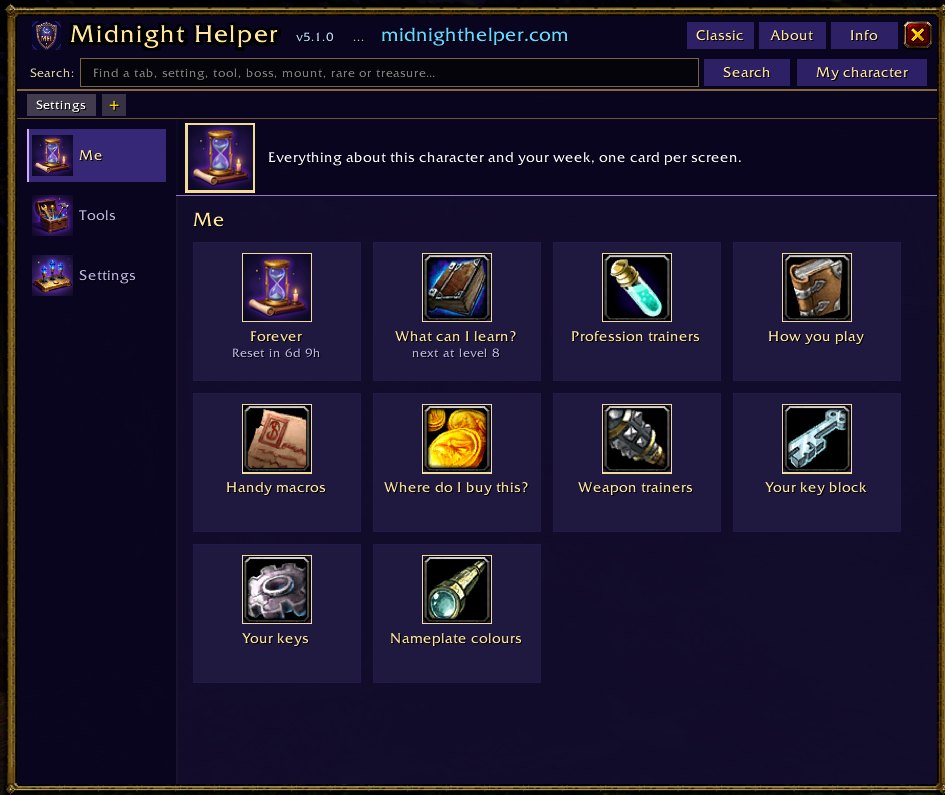
Type /mh and the overview opens, made for Forever (see New in 5.5.0). It shows:
- your level and class;
- what you can learn at your trainer right now, and what it costs, or at which level the next spells come;
- your money, so you do not have to open your bags to see if you can pay;
- Take me to my trainer: an arrow to your nearest class trainer. Midnight Helper has its own list of 218 class trainers, so this works for everyone. Have HandyNotes: Class Trainers? Midnight Helper uses it too, and you can record your own spot with
/mh trainer here. When you get close, a cross appears above your trainer. The arrow stays until you stand next to them, and both go away when you talk to the trainer; - buttons for How you play, your key block and your keys.
New at your trainer
When you level up and there is something new to learn, a window opens by itself: every spell with its rank, its price, and the key it lands on in your key block. Your money is on top, in red with what is missing when it is not enough. Passive spells say they work by themselves.
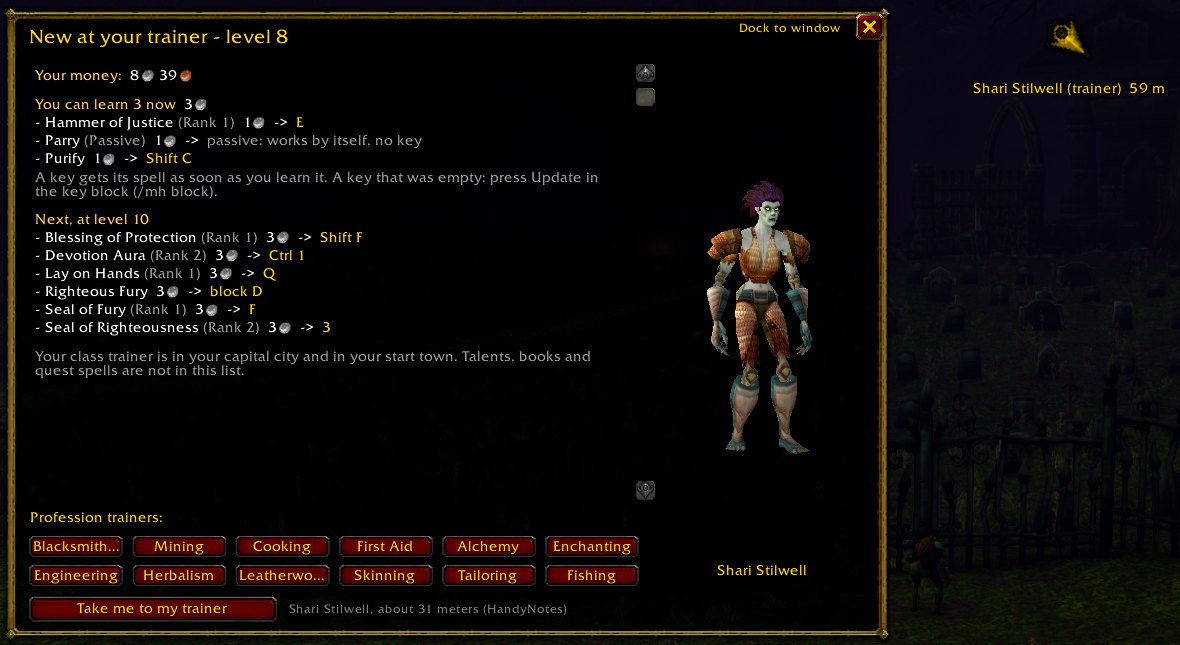
Hover over a spell in the list and you see the game's own tooltip for it, so you know what it does before you pay. Your nearest class trainer stands on the right of the window, slowly turning, with the name below. So you know who to look for when you walk in.
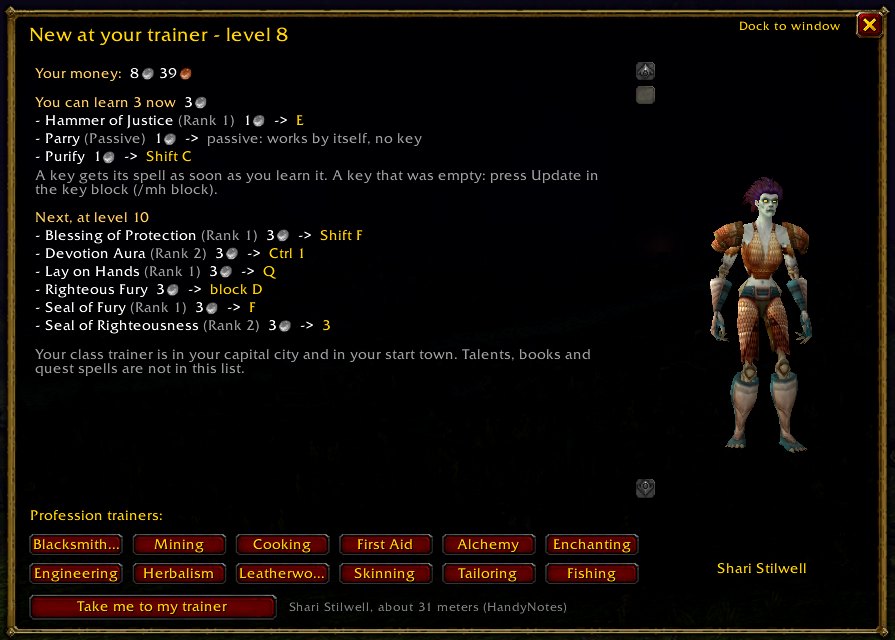
/mh trainer opens it any time; /mh trainer auto off keeps it from opening by itself.
Train all (new in 5.0.2): a button under the game's own trainer window. One click learns everything you can pay for, and Midnight Helper tells you what still waits for more money.
How you play, for all nine classes
For each class, Midnight Helper explains what your class does for someone who has never played it, your buttons for levels 1 to 10 with the key each one is on, a simple order to press them, what comes later level by level, and the mistakes beginners make. Open it from the Your class tab of the overview, or with /mh play. This is how each class starts:
Druid
The Druid can change shape. As a normal caster it throws spells and heals. Later it can turn into a bear or a cat, to fight up close. The bear has a taunt (Growl), so it is the shape for tanking.
Hunter
The Hunter shoots from a distance with a ranged weapon, and from level 10 has a pet: an animal you tame that fights next to you. Up close it has a few melee hits.
Mage
The Mage stands back and casts fire, frost and arcane magic. It keeps enemies away with spells that hold them in place or slow them. The Mage has no shapes and no stances, so every key always does the same thing.
Paladin
The Paladin is a holy fighter. It hits up close, heals itself and others, and protects friends. It has no shapes and no stances, so every key always does the same thing.
Priest
The Priest heals, and hits with holy and shadow magic from a distance. It protects friends with a shield. Later it can choose Shadowform (a talent, level 40 at the earliest): more shadow damage, but no healing.
Rogue
The Rogue fights up close with fast hits. It can sneak up on enemies unseen, and it has many ways to stop an enemy for a moment.
Shaman
The Shaman casts lightning and fire, heals, and places totems. It can fight from a distance or up close with a weapon. Dwarves (Alliance) can be a Shaman too in Forever.
Warlock
The Warlock stands back and casts shadow and fire magic. Much of its damage comes slowly: spells that hurt the enemy over time, and curses. It almost always has a demon with it.
Warrior
The Warrior fights up close with a weapon. It has three stances, and from level 10 it can tank. It does not heal itself, except with Victory Rush (level 20).
A key block for every class
The same task on the same key, on every character you make. Your spells go on fixed keys, a new rank lands on the same key by itself, and one button puts everything back.
It works in every language of WoW Forever, with the spell names your own game shows.
When you learn a new spell, Midnight Helper asks New for your key block, with the name of the spell and the key it goes on. It goes on that key as a macro: a macro casts the spell by its name, so the key always uses your highest rank. Learn rank 2, and the key does rank 2 straight away.
On a new character, Midnight Helper asks once: Set up the Midnight Helper bar layout on this character? Say Yes and your bars become blocks and are switched on, the menu and bags move to the bottom right, the gryphons go away, and the experience bar sits above your first block. Not now skips this character; Never ask again stops the question (you can turn it back on in the AddOn options).
Before you place your key block, the window names the game keys it takes over (for example C for your character window) and where to give them a new key.
Which quest reward to take
When a quest lets you pick a reward, Midnight Helper puts a frame around the best one for you: more of your class's main stats first, then Stamina, then armor. Nothing better than what you wear? It marks the one that sells for the most. Turn it off with /mh questhint off.
New in 5.5.0
One window for everything. /mh, Alt+M, the minimap button and the quick bar now open the overview (or type /mh overview). It has seven tabs; hover over a tab or a button for a short explanation. The old commands still work and open the right tab.
- Now: what to do now, what comes next, your path and this week. Details opens your trainer page: your money, what each spell costs, and the key each spell gets.
- Your class: How you play, all your class quests (each with a button for the arrow), and camping.
- Find: trainers, profession trainers, weapon masters and shops on your side, nearest first, with the way there. New: In town, with the bank, the auction house, mailboxes and inns. Neutral auction houses (Gadgetzan, Booty Bay, Everlook) trade with the other side too, but keep 15% of the sale instead of 5%.
- Professions: your skill, a card per profession, whether you carry its tool, and where to buy it.
- Dungeons & group: every dungeon with its levels and entrance, a switch Only for my level, your raid lockouts and the XP rule for groups.
- Keys & macros: your key block, your keys and the handy macros.
- Characters: all your characters, your total gold and your Legacy Points.
- The gear button: Quiet helpers lists everything Midnight Helper does by itself, each with a switch; Tools opens every other window; All commands has a search box.
The old Midnight Helper window is gone in Forever. Right-click the minimap button, or /mh settings, for the options.
More help while you level:
- Class quests for all nine classes. Do this now leads you step by step, with the arrow and the names in your language: druid forms, warlock demons, warrior stances, shaman totems, your first hunter pet, rogue poisons and more.
- How you play per role, for all nine classes: a simple order to press your spells, what you get every 10 levels, and three beginner mistakes.
- Ten new handy macros, such as eat and drink in one press, Healthstone, mana gem, Stealth and group buffs. They use your highest rank.
- Free key. Does a game key take the Shift part of a macro? The macro row says so, with a Free key button; Undo freed keys puts it back.
- Camping. Near a campfire without the camp buff, Do this now tells you to sit down. After 1 minute you get Camp Benefits for 1 hour.
- Legacy Points. Unused points? Do this now says how many, and where you spend them.
- Paladins: a blessing tip. Switch it on (
/mh blesstip on) and the tooltip of a friendly player says which blessing fits their class. - Forever Leveling Guide. While that guide runs a route, Midnight Helper draws no arrow. Want ours anyway? There is a switch in the options.
New in 5.4.0
- Best stats for you now. Do this now tells you which stats matter most for the direction you chose (and, for Warriors, Paladins and Druids, when you tank). The green line on gear tooltips follows the same advice, so healers and casters no longer get Strength or Agility advice.
- Stones, oils and poisons on the buff button. Carry a sharpening stone, weightstone, oil or (rogue) poison that fits your weapon, and nothing is on that weapon yet? The buff button shows it, and one click puts it on. Main hand and off hand.
- Dungeons in Forever. A list per zone with the level and the entrance of every dungeon, and a Route button: the arrow points to the entrance, with the boat or zeppelin when you need one. A tick box shows only the dungeons for your level. It is also a card in the Me room.
/mh dungeons. - No XP warning. When someone in your group is more than 12 levels above an enemy, nobody gets XP for it (Blizzard's rule since 14 November 2026). A red line under the group panel says so, and the dungeon list marks the dungeons where that is likely.
- New spell on no bar. Do this now tells you when a spell you just learned is on none of your bars (not when your key block takes care of it). It also names a button that still casts a lower rank, and where it is.
- Two tooltip lines. Whether your class can never use a piece of gear, and whether an item is needed for a quest in your log, with how many you still need.
- Mouseover for your buffs. With mouseover on, blessings and Arcane Brilliance from your key block land on whoever is under your mouse.
- Your characters shows a Horde or Alliance emblem for each character.
- A tidier options page. Settings that do nothing in Forever are gone, and Notice when an upgrade lands in your bags has its own switch.
- In both games: Fireworks when you level up (a short burst of stars, never in the way of your mouse; off in the options), Camera further away (one switch to zoom out further than the game allows;
/mh camera), and a warning in the macro windows when your Self Cast Key can make a mouseover macro land on yourself.
What to do now
New in 5.2.0:
- Do this now. A small window with what you can do right now: new spells at your trainer, an old rank on your bars, a weapon to learn, a missing tool. Below it, the trainer spells of your next 3 levels. The gear next to the cross picks when it shows.
/mh donow. - Which way do you want to go? Midnight Helper asks which of your class's three talent trees you want, each in one plain sentence. Later or Never ask again is fine too. How you play then says what that way needs: your armor, the weapon player guides name, and which spells need a shield.
/mh weaponsputs a green + next to the weapons that fit./mh direction. - Your characters. All your characters in one window: level and class, gold and the total, professions, and how many spells wait for them At the trainer. A character shows up after one login.
/mh alts, or the new tile in the Me room. - A card per profession. In Profession trainers: what each profession does, the tool it needs and Where to buy it. Forgot your tool? When the game says you need it, Midnight Helper names the nearest vendor with Show the way.
- Edge on buttons with an old rank. A button on your bars that still casts a lower rank gets a calm orange edge.
/mh ranks glow offturns it off. - Group panel. A small panel with your group, off until you turn it on: click a player to target them, right-click to cast your dispel on them.
/mh partytargets.
Finding your way
New in 5.1.0:
- Across the water. Is your goal on another continent, on Teldrassil, or in Ironforge while you are in Stormwind? The arrow first points you to the boat, the zeppelin, the Deeprun Tram or the portal. No Hearthstone in your bags? Midnight Helper warns you once: You have no Hearthstone: the way back is the same long trip.
- Where they really stand. When you talk to a trainer or vendor, Midnight Helper remembers the spot, on all your characters, and the arrow points there from then on. Up close it says You're there: look around, they stand right here.
- Profession trainers. Every profession trainer for your side, with an arrow to them.
/mh trainers. - Weapon trainers. Which weapons your class may learn, which you already know, who teaches them, what it costs and from which level.
/mh weapons. - Where do I buy this? The nearest vendor for your fishing pole, mining pick, skinning knife or hammer, and for trade goods, with an arrow there.
/mh vendor.
Better gear, handy macros
New in 5.1.0:
- Why is this better? Hover over gear that beats what you wear, and a green line says why: MH: +3 Strength over what you wear (main stats for a Paladin).
/mh geartip offturns it off. - You picked up an upgrade. When such gear lands in your bags, a short message on your screen says so.
/mh pickup offturns it off. - Handy macros. Ready-made macros: general ones, the top five for your class and the top three for your spec, each with why it helps.
/mh macros. - Class quests. The trainer list marks spells that come from a class quest instead of the trainer, and How you play tells a Paladin that Judgement needs a seal on.
Small helpers on the road
New in 5.1.0: This week in Forever on the start page (the weekly and daily reset, today's holidays and your raid lockouts, /mh week), a warning when you target an enemy with your fishing pole still in your hands (/mh pole off), and a finder for bar buttons that still cast an old spell rank, one click puts them on the newest (/mh ranks). The missing-buff icon now says in words which buff is missing and what to do.
New in 5.0.2:
- Missing buffs. The button you may know from Midnight. It shows when you miss a buff you can cast on yourself (your class's own buff, your armor, aura, shield, aspect, weapon buff, or your pet), and a click casts it in your highest rank. A buff from another player counts too.
- Bags almost full. A message in the middle of your screen at 2 free bag slots, and when your bags are full, with how many grey items you can sell and for how much.
/mh bagschanges the number or turns it off. - Rest first. When you target an enemy with low mana or health, you see Low mana: drink first or Low health: eat first. Forever hides your mana and health from addons, so the game itself decides when you see it.
/mh rest offturns it off. - Your last tool. A warning before you sell or destroy your last mining pick, skinning knife, blacksmith hammer or fishing pole, with a buy-back button if it already happened. Shamans see which totem item a totem spell still needs.
Good to know before you start
- Spell ranks. Most spells come in ranks: Rank 1, Rank 2, and so on. A higher rank is the same spell, only stronger. You buy new ranks from your class trainer as you level up. Midnight Helper's keys cast a spell by its name, and the game uses the highest rank you know.
- Mana is the blue bar under your health. Most spells cost mana. When it is empty, you cannot cast.
- Cooldown = the wait before you can press a spell again.
The commands
/mh | The overview, with seven tabs. |
/mh settings | Midnight Helper in the game's settings. |
/mh blesstip on | Paladins: the blessing tip on friendly players. |
/mh trainer | What is new at your trainer, with prices and keys. |
/mh play | How you play your class. |
/mh block | Your key block. |
/mh questhint off | Stop marking the best quest reward. |
/mh bags | When the bag message shows, or turn it off. |
/mh rest off | Stop the drink first and eat first messages. |
/mh trainers | Profession trainers, with an arrow. |
/mh weapons | Weapon trainers for your class. |
/mh vendor | Where do I buy this? |
/mh macros | Handy macros for your class and spec. |
/mh week | This week in Forever. |
/mh ranks | Bar buttons that still cast an old rank. |
/mh geartip off | Stop the green line on gear tooltips. |
/mh pickup off | Stop the upgrade message. |
/mh donow | Do this now: what you can do right now. |
/mh direction | Pick or change your direction. |
/mh alts | Your characters. |
/mh partytargets | The group panel. |
/mh dungeons | Dungeons in Forever, with a route to the entrance. |
/mh camera | Camera further away, on or off. |
/mh survey | The link to the short survey for Forever players. |
/mh usedfor off | Stop the profession line on ingredient tooltips. |
/mh move | Move Midnight Helper's parts on your screen. |
The texts in German, French, Spanish, Portuguese, Italian and Russian are our own translation. Native speakers: corrections are very welcome. Found something odd, or does everything just work? Tell us: /mh report in the game, or the feedback form.